> For the complete documentation index, see [llms.txt](https://docs.hyperbot.network/llms.txt). Markdown versions of documentation pages are available by appending `.md` to page URLs; this page is available as [Markdown](https://docs.hyperbot.network/official-links/telegram-management-bot.md).
# Telegram Management Bot
Welcome to HyperBot! Your centralized hub for account management and real-time trade alerts. HyperBot helps you manage multi-device sessions, configure on-chain monitoring, and stay ahead of the market with instant trade notifications. Follow this guide to get started.
#### 🌎 Language Settings
Upon your first interaction, you can customize the interface to your preferred language.
* How to switch: Click the 🇺🇸 English or 🇨🇳 中文 button located directly beneath the welcome message.
* Effect: All menus, buttons, and future notifications will instantly update to your chosen language.
#### 🔍 Core Feature: Address Monitoring
HyperBot features a robust on-chain monitoring system using a "Dual-Bot Architecture" to ensure zero-lag notifications and a clutter-free management experience.
**Step 1: Add a Watchlist Address**
1. Click the 👀 Monitor Address button in the main menu.
2. Paste the EVM wallet address you wish to track into the chat.
3. Format Requirements: Must start with `0x`, be 42 characters long, and consist only of alphanumeric characters (0-9, a-f).
* The system will automatically validate the address and initiate tracking.
**Step 2: Enable Notifications (Crucial)**
HyperBot separates Management from Alerts for optimal performance:
* HyperBot Trading Bot(Main Bot): Used exclusively for configuration and account settings.
{% content-ref url="/spaces/mskbSePPeM33HwP2FVNt/pages/TNlIW0lCAORhInRDUILv" %}
[TG Trading Bot-Market Trends Alert](/get-started/discover-and-monitor/track-and-monitor/tg-trading-bot-market-trends-alert.md)
{% endcontent-ref %}
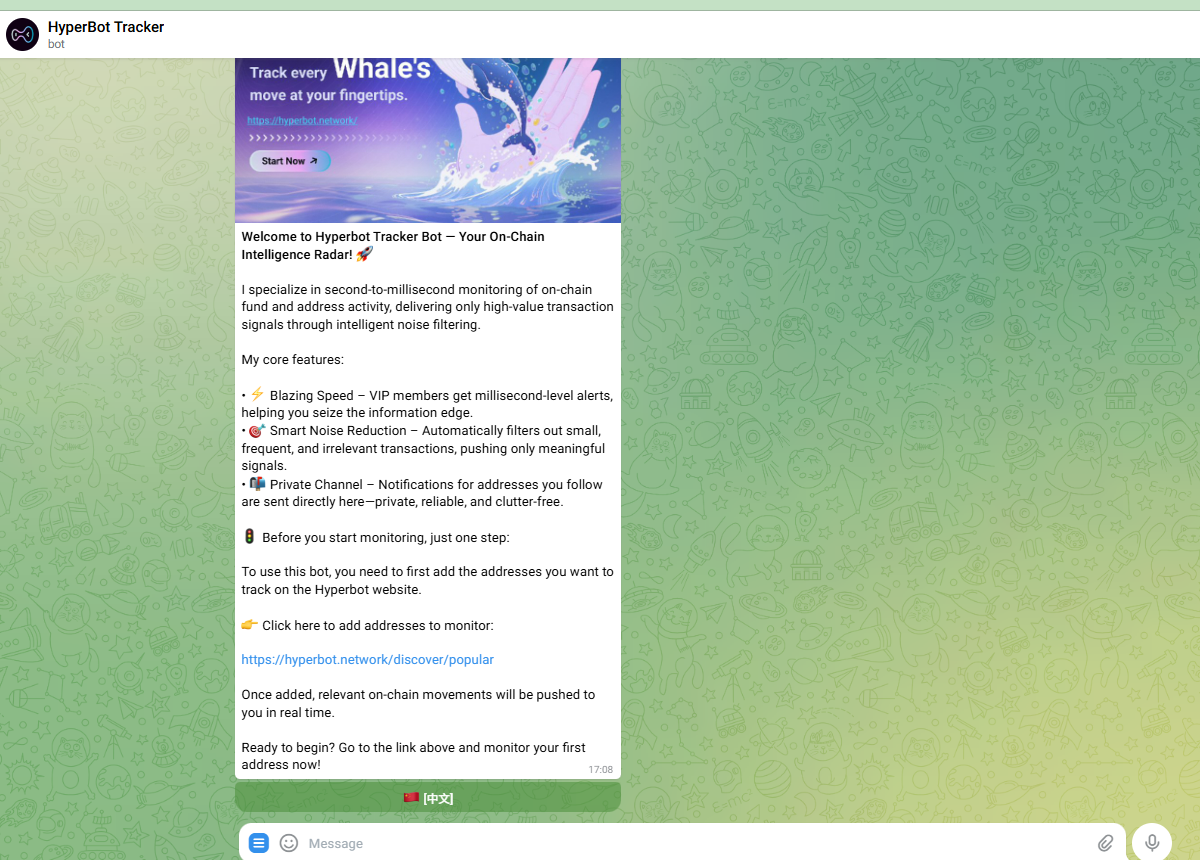
* Hyperbot Tracker Bot (Alert Bot): Dedicated to delivering real-time on-chain activity alerts.
{% content-ref url="/spaces/mskbSePPeM33HwP2FVNt/pages/0d86e8cd07cca9b2ee825aa226473f139b567773" %}
[TG Tracker Bot-Whale Alerts](/get-started/discover-and-monitor/track-and-monitor/tg-tracker-bot-whale-alerts.md)
{% endcontent-ref %}
> ⚠️ Action Required: After adding an address, you must click the link to the 👉 Hyperbot Tracker Bot and press "Start." Without this step, you will not receive push notifications.
#### 💰 Referral Rewards Program
Earn passive income by inviting friends to the HyperBot ecosystem.
**Commission Structure**
Click the 🤝 Referrals button to view the current reward tiers:
* Trading Fee Rebates: 40% from Direct Referrals + 10% from Indirect Referrals.
* Subscription Rebates: 5% commission on all membership plans.
* Earnings are automatically settled and credited to your account.
**How to Promote**
Use the quick-action buttons on your referral card:
* 📩 One-Click Share: Instantly opens the Telegram forwarding panel to send your unique invite link to friends, groups, or channels.
* 📊 Referral Dashboard: Click to visit the HyperBot official website (requires auth login) to view detailed analytics and reward statements.
***
#### 🚀 Resources & Navigation
Access the full HyperBot ecosystem via these quick links:
* 📱 [Download App: ](https://play.google.com/store/apps/details?id=network.hyperbot.app.hyperbot_app)Get the Android client on Google Play or access the [iOS Beta.](https://testflight.apple.com/join/aQZPfg8b)
* 🖥 Official Website: Visit the [HyperBot Web Terminal ](https://hyperbot.network/)for advanced trading tools, copy-trading strategies, and deep data analytics.
* 📖 Documentation: Click 📖 User Guide in the bottom menu for the full GitBook documentation, FAQs, and advanced pro-tips.