> For the complete documentation index, see [llms.txt](https://docs.hyperbot.network/llms.txt). Markdown versions of documentation pages are available by appending `.md` to page URLs; this page is available as [Markdown](https://docs.hyperbot.network/get-started/copy-trading/ii.-telegram-bot/quickstart-hyperliquid-aster-users/importing-a-hyperliquid-wallet-created-by-hyperbot.md).
# Importing a Hyperliquid Wallet Created by Hyperbot
If your wallet was created by Hyperbot and you want to import it to BOT, please follow these steps:
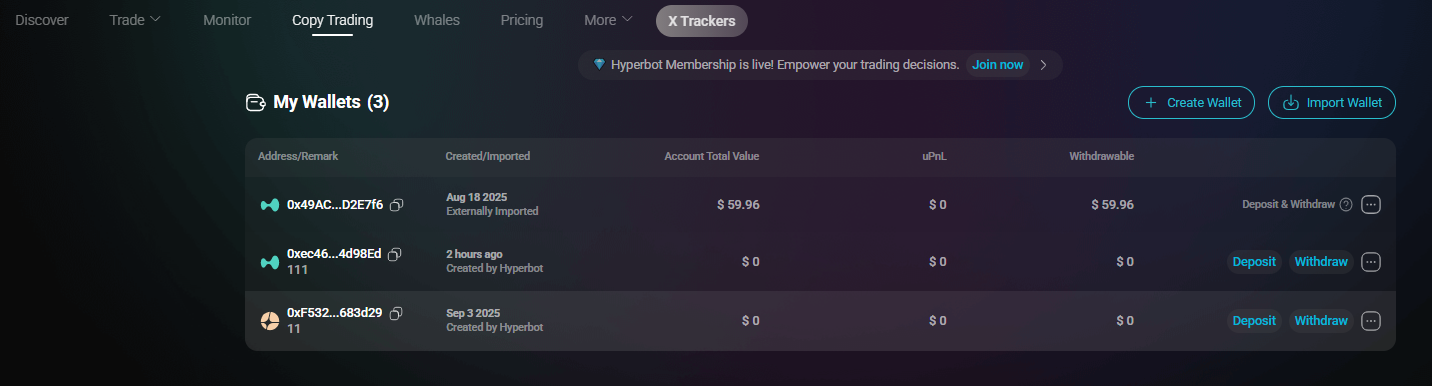
1. Go to the copy trading page:
2. On the "My Wallets" page, locate the Hyperliquid wallet labeled "Created by Hyperbot" (this wallet has been authorized and bound with an API, enabling copy trading and transactions on Hyperbot).
3. Click "Copy" for this wallet—this is the "Master Wallet" address—and send it to the bot.
4. Click the "..." in the lower right corner, select "Export Private Key," copy the API private key, and send it to the bot to complete the binding process.